绘制心电图
https://github.com/SeekerFighter/LuckyEcgDemo
https://www.jianshu.com/p/16301de41a18
表单输入

1
2
3
4
5
6
7
8
9
10
11
12
13
14
15
16
17
18
19
20
21
22
23
24
25
26
27
28
29
30
31
32
33
34
35
36
37
38
39
40
41
42
43
44
45
46
47
48
49
50
51
|
public class EditTextRight extends AppCompatEditText {
private String txtRight;
private Paint mPaint;
public EditTextRight(Context context) {
super(context);
}
public EditTextRight(Context context, AttributeSet attrs) {
super(context, attrs);
initAttrs(context, attrs);
}
private void initAttrs(Context context, AttributeSet attrs) {
TypedArray ta = context.obtainStyledAttributes(attrs, R.styleable.EditTextRight);
mPaint = new Paint(Paint.ANTI_ALIAS_FLAG);
txtRight = ta.getString(R.styleable.EditTextRight_textright);
ta.recycle();
}
@Override
protected void onDraw(Canvas canvas) {
super.onDraw(canvas);
float txtSize = getTextSize();
if (!TextUtils.isEmpty(txtRight)) {
float yrig = getWidth() - txtSize * txtRight.length() - 10;
Timber.d("txt " + txtRight + " getRight " + yrig);
canvas.drawText(txtRight, yrig, getBaseline(), getPaint());
}
}
}
<com.jonzhou.mineutils.ui.customview.EditTextRight
android:layout_width="100dp"
android:layout_height="wrap_content"
mineutils:textright="幢" />
|
自定义属性
画正方形
1
2
3
4
5
6
7
8
9
10
11
12
13
14
15
16
17
18
19
20
21
22
23
24
25
26
27
28
29
30
31
32
33
34
35
36
37
38
39
40
41
42
43
44
45
46
47
48
49
50
| public class MyView extends View {
public MyView(Context context) {
super(context);
}
public MyView(Context context, AttributeSet attrs) {
super(context, attrs);
Timber.i(" MyView(Context context, AttributeSet attrs)");
}
public MyView(Context context, AttributeSet attrs, int defStyleAttr) {
super(context, attrs, defStyleAttr);
}
@Override
protected void onMeasure(int widthMeasureSpec, int heightMeasureSpec) {
super.onMeasure(widthMeasureSpec, heightMeasureSpec);
Timber.i("onMeasure(int widthMeasureSpec, int heightMeasureSpec)");
int width = getMySize(100, widthMeasureSpec);
int height = getMySize(100, heightMeasureSpec);
if (width < height) {
height = width;
} else {
width = height;
}
Timber.i("width " + width + " height " + height);
setMeasuredDimension(width,height);
}
private int getMySize(int defaultSize, int measureSpec) {
int mySize = defaultSize;
int mode = MeasureSpec.getMode(measureSpec);
int size = MeasureSpec.getSize(measureSpec);
switch (mode) {
case MeasureSpec.UNSPECIFIED:
mySize = defaultSize;
break;
case MeasureSpec.AT_MOST:
mySize = size;
break;
case MeasureSpec.EXACTLY:
mySize = size;
break;
}
return mySize;
}
}
|
设置 match_parent不是正方形?
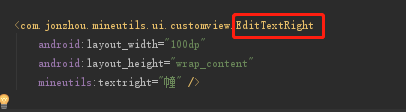
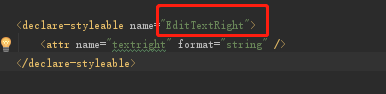
关于自定义属性不提示 declare-styleable name要和自定义类名相同,然后重启Ide就好了
那么获取到的mode和size又代表了什么呢?
mode代表了我们当前控件的父控件告诉我们控件,你应该按怎样的方式来布局。
mode有三个可选值:EXACTLY, AT_MOST, UNSPECIFIED。它们的含义是:
EXACTLY:父控件告诉我们子控件了一个确定的大小,你就按这个大小来布局。比如我们指定了确定的dp值和macth_parent的情况。
AT_MOST:当前控件不能超过一个固定的最大值,一般是wrap_content的情况。 UNSPECIFIED:当前控件没有限制,要多大就有多大,这种情况很少出现。
下面是一个重写onMeasure的固定伪代码写法:
1
2
3
4
5
6
7
8
9
| if mode is EXACTLY{
父布局已经告诉了我们当前布局应该是多大的宽高, 所以我们直接返回从measureSpec中获取到的size
}else{
计算出希望的desiredSize
if mode is AT_MOST
返回desireSize和specSize当中的最小值
else:
返回计算出的desireSize
}
|
原文:https://blog.csdn.net/yissan/article/details/51136088
自定义属性不提示
按照如图两名称一致,重启AndroidStudio
https://blog.csdn.net/skysmile_/article/details/78833438
https://developer.android.com/guide/topics/ui/custom-components
https://developer.android.com/training/custom-views/custom-drawing
绘图
http://blog.csdn.net/huaiyiheyuan/article/details/52205969
画圆
http://www.jianshu.com/p/d891fe636898
https://juejin.im/post/5c7f4f0351882562ed516ab6#heading-17
https://blog.csdn.net/guolin_blog/article/details/48719871
Kotlin
1
2
3
4
5
6
7
8
9
10
11
12
13
| class TermRoundView @JvmOverloads constructor(
context: Context?, attrs: AttributeSet?,
defStyleAttr: Int = 0
) : View(context, attrs, defStyleAttr) {
init{
val a = context?.theme?.obtainStyledAttributes(attrs, R.styleable.TermRoundView, 0, 0)
try {
isRulerInput = a!!.getBoolean(R.styleable.TermRoundView_isRulerInput, false)
} finally {
a?.recycle()
}
}
}
|
https://juejin.im/post/6844903909320835080