Annotation
Annotations are used to provide supplementary information about a program and can be used for a variety of purposes, such as:
- Information for the compiler: Annotations can be used by the compiler to detect errors or suppress warnings.
- Compile-time processing: Software tools can process annotation information to generate code, XML files, etc.
- Runtime processing: Some annotations are available to be examined at runtime via reflection.
https://docs.oracle.com/javase%2Ftutorial%2F/java/annotations/index.html
注解
注解的作用
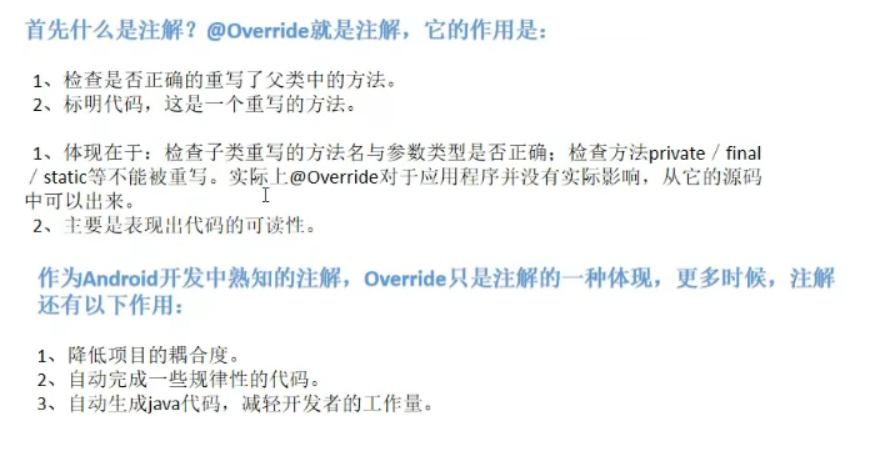
- 提供信息给编译器: 编译器可以利用注解来探测错误和警告信息.
- 编译阶段时的处理: 软件工具可以用来利用注解信息来生成代码、Html文档或者做其它相应处理。
- 运行时的处理: 某些注解可以在程序运行的时候接受代码的提取.
元注解 : 不可以再分的注解, 负责注解其他注解。java定义了4个标准的meta-annotation类型,它们被用来提供对其它annotation类型作说明。Target Retention Documented Inherited
如上图的 Overide被@Target和@Retention修饰,他们用来说明解释其他注解,位于 java.lang.annotation下
Annotations That Apply to Other Annotations
Annotations that apply to other annotations are called meta-annotations. There are several meta-annotation types defined in java.lang.annotation.
@Retention
@Retention annotation specifies how the marked annotation is stored:
需要什么级别保存该注释信息,用于保留注解的生命周期
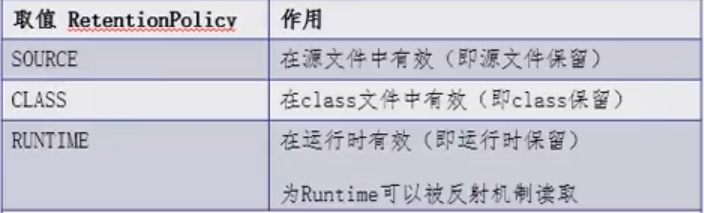
RetentionPolicy.SOURCE
The marked annotation is retained only in the source level and is ignored by the compiler.
RetentionPolicy.CLASS
– The marked annotation is retained by the compiler at compile time, but is ignored by the Java Virtual Machine (JVM).
RetentionPolicy.RUNTIME – The marked annotation is retained by the JVM so it can be used by the runtime environment.
RetentionPolicy.RUNTIME
The marked annotation is retained by the JVM so it can be used by the runtime environment.
编译和运行时注解区别
运行时注解
运行时注解的实质是,在代码中通过注解进行标记,运行时通过反射寻找标记进行某种处理。而运行时注解一直以来被呕病的原因便是反射的低效。
https://juejin.cn/post/6925283352698159117#heading-4
注解设置 SxtStudent信息,映射数据库
1 |
|
1 |
|
1 |
|
通过第三方工具获取注解信息
1 | try { |
运行结果
@annotation.SxtTable(value=tb_student)
tb_student
sname–varchar—10
运行时注解很好理解,代码运行的时候通过反射技术就可以获取上面的注解信息。从上面可以看到,反射增加了点性能问题
反射实例
1 | String path = "reflection.User"; |
https://www.youtube.com/watch?v=vZe5zG0vh3U&list=PLC664nq_h8b9Jzh-qYJ_AeOpmSoBLC_tg&index=1
编译时注解
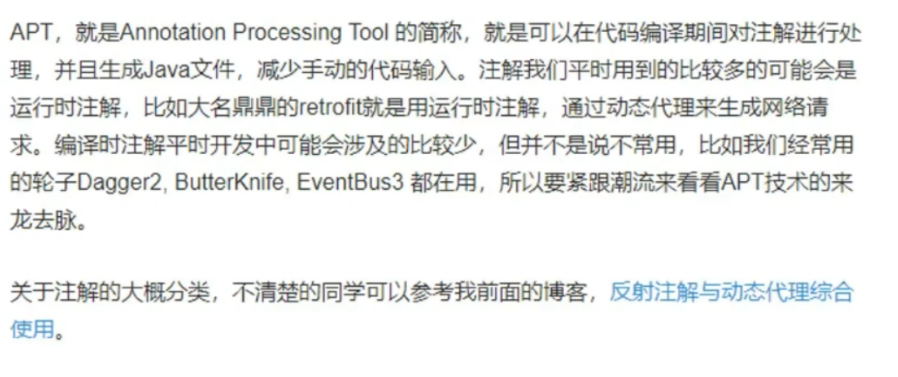
APT(Annotation Processing Tool)即注解处理器(通常也叫做编译时注解、编译时代码自动生成),是一种处理注解的工具,确切的说它是javac的一个工具,它用来在编译时扫描和处理注解。注解处理器以Java代码(或者编译过的字节码)作为输入,生成.java文件作为输出。
简单来说就是在编译期,通过注解生成.java文件。
通过上面的讲解,我们知道了:通常编译时注解要结合注解处理器一起使用的,通过解析注解,获取注解上面的信息,然后生成代码,从而生成一下辅助我们自己手写的代码。说得有点抽象,下面通过一个简单示例来演示一下。
我们做微信相关api,会有下面操作
示例最终效果如下:
1 |
|
我们通过一个@SubTypeAutoGenerate注解就可以很方便地生成WXEntryActivity啦,其中@SubTypeAutoGenerate注解的参数就是生成的全类名。
reference: https://juejin.cn/post/6925283352698159117
根据前面注解分类,编译时注解是保留到编译阶段的,即.class文件,不会保留到dex里面,即运行时根本获取不到这个注解了,那么这种编译时注解又有什么用呢?
注解处理器
是javac处理注解的一种工具,它用来在编译时扫描和处理注解。简单来说就是在编译器,通过注解采集信息,生成.java文件。减少重复代码的编写。
APT原理

步骤
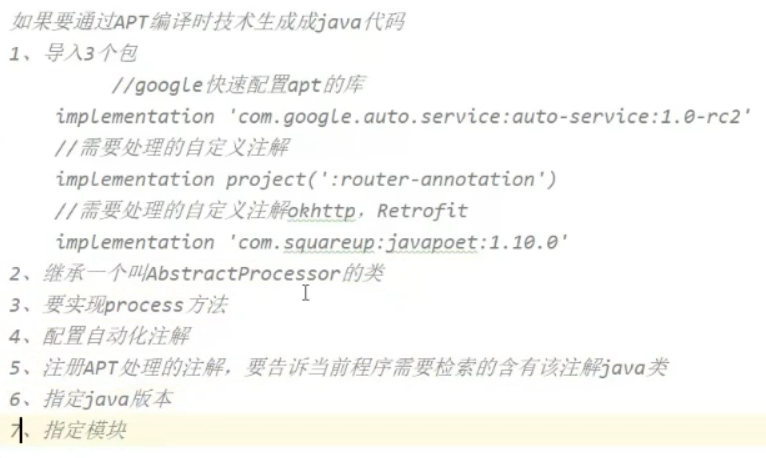
问题
APT就这固定的几步,网上demo可以生成,我的就是没法生成,原来是因为,@DIActivity类的头部没有设置
1 |
|
项目 MRouter
Arouter
原理
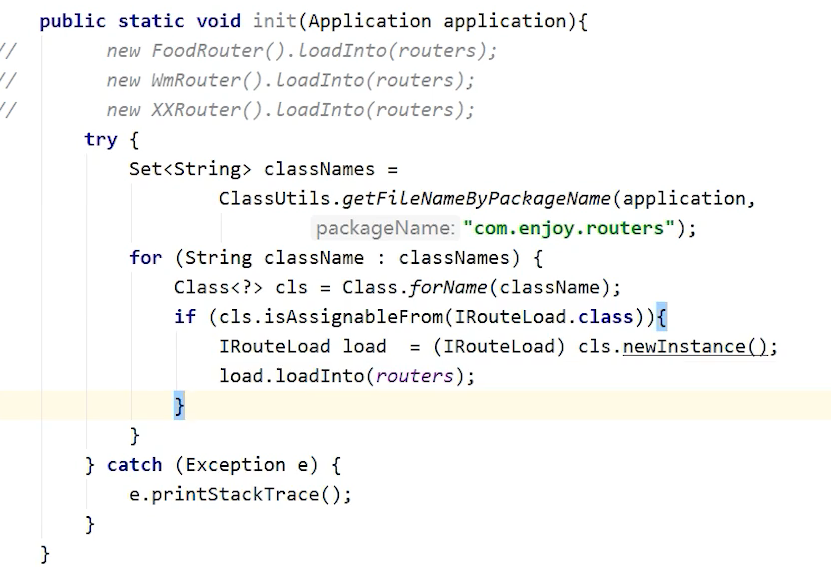
获得当前程序在手机中对应的apk文件,使用classsloader:dexfile(PMS),反射获取apk所有的类,筛选出注册activity的类。初始化
核心实现
https://www.bilibili.com/video/BV1Ly4y1W7f5?p=6&spm_id_from=pageDriver
https://www.bilibili.com/video/BV1nU4y1a79o?from=search&seid=3188418579827888379
https://juejin.cn/post/6925283352698159117#heading-14
https://juejin.cn/post/6947992544252788767
https://blog.csdn.net/xx326664162/article/details/68490059
https://hanshuliang.blog.csdn.net/article/details/117072224
https://github.com/han1202012/APT
@Target
@Target annotation marks another annotation to restrict what kind of Java elements the annotation can be applied to. A target annotation specifies one of the following element types as its value:
ElementType.ANNOTATION_TYPE can be applied to an annotation type.
ElementType.CONSTRUCTOR can be applied to a constructor.
ElementType.FIELD can be applied to a field or property.
ElementType.LOCAL_VARIABLE can be applied to a local variable.
ElementType.METHOD can be applied to a method-level annotation.
ElementType.PACKAGE can be applied to a package declaration.
ElementType.PARAMETER can be applied to the parameters of a method.
ElementType.TYPE can be applied to any element of a class.
用于描述注解的使用范围(注解可以用在什么地方)
如 类 属性 方法等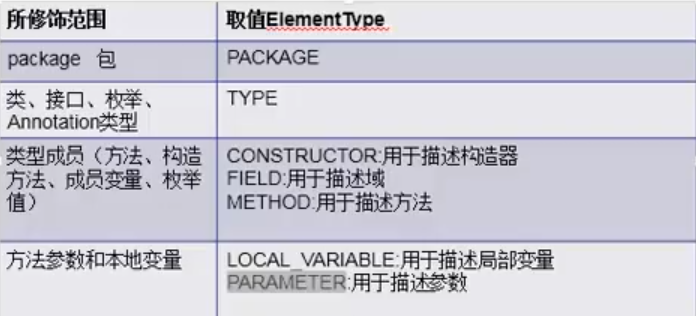
@Inherited
@Inherited annotation indicates that the annotation type can be inherited from the super class. (This is not true by default.) When the user queries the annotation type and the class has no annotation for this type, the class’ superclass is queried for the annotation type. This annotation applies only to class declarations.
标明所修饰的注解,在所作用的类上,是否可以被继承。
1 |
|
output:
SubClass inherits annotation: Applied to SuperClas , 所以可以拿到父类的注解信息。
@Repeatable
@Repeatable annotation, introduced in Java SE 8, indicates that the marked annotation can be applied more than once to the same declaration or type use. For more information, see Repeating Annotations.
1 |
|
output :
1 | Positive |
@Documented
@Documented annotation indicates that whenever the specified annotation is used those elements should be documented using the Javadoc tool. (By default, annotations are not included in Javadoc.) For more information, see the Javadoc tools page.
javadoc的工具文档化
Declaring an Annotation Type ,Generate Document
ClassPreamble.java
1 | package annotation.doc; |
MyClass.java
1 | package annotation.doc; |
command steps
1 | $ pwd |
这种方式可以生成文档